Sync Outlook 2019 Contacts with iPhone using Free Sync2 Cloud
Sync Outlook 2019 Contacts with iPhone in one-way or two-way. Sync Contacts automatically with several accounts at once.
 FREE DOWNLOAD
No Commitment. Privacy Policy and
System Requirements
 PURCHASE
Software you can trust Licensing (EULA)
Compare Free with Pro
Sync2 Cloud Customers Reviews

About Sync2 Cloud
Sync2 Cloud is a Free* software product to sync Outlook 2019 Contacts with iPhone. Sync your Microsoft Outlook Calendar, Contacts and Tasks with Google, iCloud and Office 365.
Features related to sync Outlook 2019 Contacts with iPhone
Sync Outlook 2019 Contacts with iPhone and share them with users on iCloud, Google or Office 365.
Sync Outlook 2019 Contacts with iPhone

Sync2 Cloud provides an easy way to Sync Outlook 2019 Contacts with iPhone. Install Sync2 Cloud on a computer with Outlook and log in to your iCloud account. From now on, all devices with connected iCloud account will have Contacts synchronized.

Automatic synchronization with iPhone
All changes made on Outlook will be synchronized with iPhone automatically. If you have added several accounts - they will be updated all at once. You can synchronize your Contacts manually or set automatic synchronization with predefined time intervals.

One-way or two-way synchronization
Sync Outlook 2019 Contacts with iPhone in a two-way or one-way scenario. Two-way synchronization will ensure that Contacts are up to date both on Outlook and connected account. New Contacts added would appear on all conected accounts. With one-way synchronization Contacts would be updated only on Outlook or iPhone and not the other way.

Sync Outlook Contacts with iPhone wirelessly
To Sync Outlook 2019 Contacts with iPhone you need Sync2 Cloud and internet connection. Sync2 Cloud will synchronize your Contacts between Outlook and iCloud. With synchronization enabled on iPhone, your Contacts will stay up to date without a need for iTunes.

Sync Outlook Calendar, Contacts and Tasks
With Sync2 Cloud you can sync not only Contacts, but Calendar events and Notes also. Keep most important information continuously synchronized and at your fingertips. With Sync2 Cloud you can sync Outlook data with devices you use.

Synchronize across different Outlook versions
Sync2 Cloud supports synchronization with different Outlook versions. No matter if you use Outlook 2007, 2010, 2013, 2016 or 2019. We will Sync Outlook 2019 Contacts with iPhone with ease.
How to sync Outlook 2019 Contacts with iPhone
Step by step instructions on how to sync Outlook 2019 Contacts with iPhone.
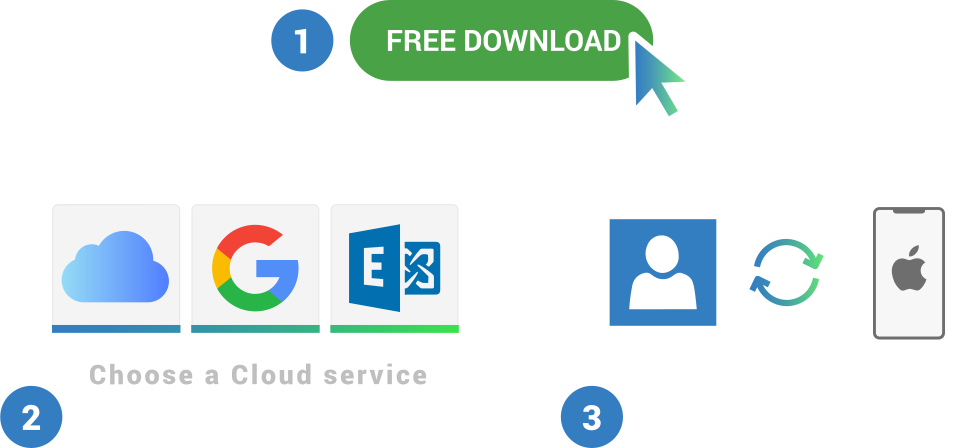
- Download and Install Sync2 Cloud on a PC where Microsoft Outlook needs to be synchronized;
- Launch Sync2 Cloud, click “Add source/account”, choose Google/iCloud/Office 365 synchronization option and log in to you Google/iCloud/Office 365 account;
- Select Contacts option and click “Next”;
- Choose one-way or two-way synchronization;
- Click “Finish” to begin synchronization.
- More info
About Outlook 2019
Easily sync Outlook 2019 Contacts with iPhone with Sync2 Cloud software.

Outlook is an email application by Microsoft, that also features a calendar, contacts, tasks, notes, journal and web browsing. Microsoft Outlook 2019 was released on 2018 September.
With the main new features in Outlook 2019 you can:
Use Focused Inbox – it helps you focus on the emails that matter most to you by separating inbox into two tabs—Focused and Other. Add multiple time zones to your calendar to easily schedule a meeting across time zones. Let Outlook read your email messages aloud. Set your reminders to pop up over the windows you're working in. See people's responses to a meeting request, even if you aren't the meeting organizer. Download Cloud attachments automatically.

About 4Team Corporation
The company behind Sync2 Cloud
We are a Microsoft Gold Certified Partner and independent software developer and vendor. Since 1999 we are building Synchronization and Sharing tools for Microsoft Outlook to our corporate customers and individual end-users worldwide. We are very proud to be highly recommended by our satisfied customers, and offer award-winning support.
Our satisfied customers
Customers all over the world are successfully using 4Team Corporation services for personal and business needs